
Overview
FutureWeather for Grasshopper is a native .gha plugin that generates future climate-adjusted weather files directly on the canvas. You provide a historical EPW, choose a future year and emissions scenario, and the component calls the FutureWeather.co API behind the scenes. The output file paths wire directly into Ladybug and Honeybee components — no file juggling or browser needed.
The plugin uses CMIP6 climate projections, the current generation of IPCC climate models, to morph a historical EPW into a future-ready EPW. If you provide a historical DDY file, it also generates a matching future DDY for HVAC sizing.
This workflow is designed for building energy simulation, HVAC sizing, climate analysis, comfort studies, and resilience planning — anywhere you use weather files in Ladybug Tools.
How it works
1. Install the plugin
In Rhino, type PackageManager, search for FutureWeather, and click Install. Restart Rhino and Grasshopper.
2. Create an account
Sign up at app.futureweather.co to get 5 free credits and test the included example files.
3. Create an API key
Inside the app, open API Docs in the left navigation, switch to the API Keys tab, click Create Token, and save your PAT somewhere secure. It starts with fw_ and gets pasted into the API Key input on the canvas.
4. Open an example and run
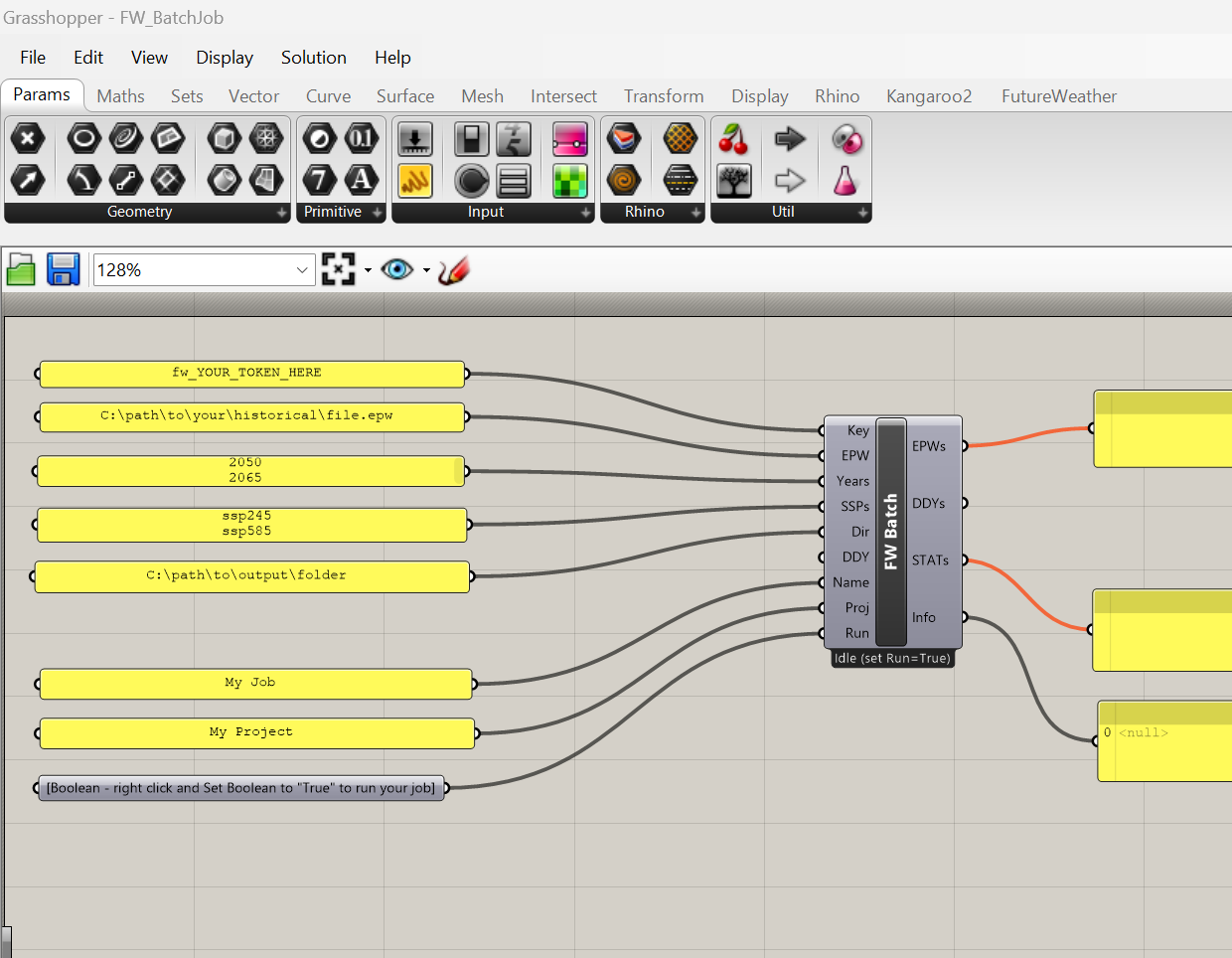
Open one of the included .gh example files. Replace the placeholder values with your token, file paths, year, and scenario. Right-click the Boolean toggle and set it to True to run.
Run toggle safety
Every component that spends credits has a Run boolean input that defaults to False. This prevents accidental credit spend when opening a file or changing upstream parameters. You must explicitly set it to True each time you want to run.
Example files
The plugin includes ready-to-use Grasshopper files so you do not have to build a canvas from scratch. Each has a pre-wired layout with all inputs connected and placeholder values — just replace them with your token, parameters, and file paths. The example files are the fastest way to get started.
Where to find the example files
After installing from the Rhino Package Manager, the example .gh files are located in the package's examples folder:
For example: C:\Users\<you>\AppData\Roaming\McNeel\Rhinoceros\packages\8.0\futureweather\1.0.2\examples\
If you are using Rhino 7, replace 8.0 with 7.0. %APPDATA% points to your Windows AppData\Roaming folder, not AppData\Local.
FW_SingleJob.gh
Generate one future EPW for a single year and scenario. The fastest way to validate your API key and test the workflow.
FW_SingleJobWithDDY.gh
Same as the single-job example, but with a historical DDY input so you can generate a matching future DDY for HVAC sizing workflows.
FW_BatchJob.gh
Generate EPWs for multiple year and scenario combinations in one run. For example, [2050, 2080] with [ssp245, ssp585] creates four future EPW files.
FW_BatchJobWithDDY.gh
Batch-generate future EPW and matching DDY outputs across multiple year and scenario combinations when your workflow needs both simulation and HVAC sizing files.
Components
All components appear under the FutureWeather tab in Grasshopper. The plugin includes both one-step async components for quick use and lower-level components for custom non-blocking workflows.
FW Future Weather
Submit, poll, and download a future EPW in one step. Runs asynchronously so the canvas stays responsive. Best for straightforward single-file workflows.
FW Future Weather Batch
Generate multiple year and scenario combinations in one run. Best for parametric studies, resilience testing, and multi-scenario comparisons.
FW Authenticate
Validate your API key and confirm your credit balance before launching a generation run.
FW List Projects
List your projects in the FutureWeather dashboard for organizing jobs by client or building.
FW Submit Job
Submit a job without waiting for completion. Returns a job ID immediately. Useful for custom sequencing in advanced workflows.
FW Check Status
Poll a submitted job's status. Wire to a Grasshopper Timer component for auto-polling.
FW Download Results
Download generated EPW, DDY, and STAT files after a job completes.
Input reference
Every input used by the FutureWeather Grasshopper components is summarized below. All inputs accept text from Grasshopper Panels — no sliders or type conversions needed.
| Input | Required | Description |
|---|---|---|
| Key | Yes | Your Personal Access Token. Starts with fw_. Create one in the app under API Docs > API Keys. |
| EPW | Yes | Path to your historical EPW weather file. Type or paste a file path in a Panel. |
| Year | Yes | Target future year between 2035 and 2090 (e.g., 2050). Uses a 30-year window around the target to reduce statistical noise. Enter as text in a Panel. |
| Years | Yes, batch | List of target years for batch generation. Put each year on its own line in a Panel, or separate with commas (e.g., 2050, 2080). |
| SSP | Yes | CMIP6 climate scenario code. Options: ssp126, ssp245, ssp370, ssp585. See the scenario reference below. |
| SSPs | Yes, batch | List of scenario codes for batch generation. One per line in a Panel, or comma-separated (e.g., ssp245, ssp585). |
| Dir | Yes | Output directory where generated files will be saved. |
| DDY | No | Path to a historical DDY file. When provided, a future-adjusted DDY is generated alongside the EPW. |
| Name | No | Friendly label for the job (e.g., Chicago Office 2050) to help identify it in the dashboard. |
| Project | No | Project label for organization. If the project does not exist yet, it is created automatically. |
| Run | Yes | Boolean toggle. Defaults to False. Set to True to start the job. Prevents accidental credit spend. |
Climate scenarios
| Scenario | Code | Global Warming by 2100 |
|---|---|---|
| SSP1-2.6 | ssp126 |
~1.8°C |
| SSP2-4.5 | ssp245 |
~2.7°C |
| SSP3-7.0 | ssp370 |
~3.6°C |
| SSP5-8.5 | ssp585 |
~4.4°C |
Climate scenarios represent possible futures. They combine socioeconomic pathways with different levels of greenhouse gas emissions. In general, higher scenarios like SSP5-8.5 represent more warming and greater climate impacts.
Climate models
FutureWeather uses an ensemble of 23 CMIP6 global climate models to produce robust multi-model average projections. In the Grasshopper plugin, the full ensemble is used automatically by default.
If you need to select specific climate models for research or a custom workflow, use the FutureWeather web app or API, both of which support model-level selection.
What you get
Future EPW
Annual hourly weather data for EnergyPlus, OpenStudio, Ladybug, Honeybee, and other tools that accept standard EPW files. Always generated.
Future DDY
Future design day conditions in ASHRAE format for HVAC sizing. Generated when you provide a historical DDY input.
STAT report
Climate statistics summary generated alongside the EPW output for quick review and reporting.
Batch generation
Need multiple scenarios or multiple future years? Use FW Future Weather Batch to generate all combinations in one run.
Example: [2050, 2080] × [ssp245, ssp585] creates four future weather files in a single run, using four credits.
Results are organized into subdirectories by year and scenario, such as output_dir/2050_ssp245/ and output_dir/2080_ssp585/.
Ladybug / Honeybee integration
FutureWeather outputs file paths that wire directly into downstream Ladybug and Honeybee components. Everything downstream works exactly the same — the only difference is that the EPW now represents future rather than historical climate conditions.
Climate analysis (Ladybug)
For sun path diagrams, wind roses, psychrometric charts, radiation analysis, and UTCI comfort maps, wire the future EPW into LB Import EPW:
[LB Download Weather]
        |
        v  epw_file
[FW Future Weather]
   Year: 2060
   SSP:  ssp245
   Run:  True
        |
        v  EPW (file path)
[LB Import EPW]
        |
        v  dry_bulb_temp, wind_speed, radiation ...
[LB SunPath]  [LB Wind Rose]  [LB Psychrometric Chart]
Energy simulation (Honeybee)
For building energy simulation and HVAC sizing, wire the future EPW and DDY paths into HB Model to OSM:
[FW Future Weather]
   EPW + DDY inputs
   Year: 2060
   SSP:  ssp245
        |            |
        v EPW        v DDY
[HB Model to OSM]  [HB Sizing Parameter]
        |                   |
        v                   v
    annual sim         HVAC sizing
        |
        v
[HB Read Room Energy Result]
   heating, cooling, peak loads
Why the DDY matters for sizing
EnergyPlus uses design day conditions from the DDY file to size HVAC systems. A historical DDY might define the 0.4% cooling design day at 35°C, but by 2060 the equivalent design day could be 38°C. If you morph the EPW but keep the historical DDY, the cooling system gets sized for today's extremes but simulated in a hotter climate — it may be undersized.
When you provide a historical DDY alongside the EPW, FutureWeather generates a future DDY that shifts the design conditions in lockstep with the morphed EPW, keeping your sizing and simulation consistent.
Why Future Weather
The science
Pricing
The Grasshopper plugin is free. Weather file generation uses credits, where one credit equals one run and includes an EPW, STAT, and optional DDY output.
| Credits | Price | Per File |
|---|---|---|
| 1 | $50 | $50 |
| 4 | $100 | $25 |
| 8 | $160 | $20 |
| 10+ | $17 each | $17 |
New users get 5 free credits to test the service and try the included example files.
Enterprise & Partners
Planning larger studies, team workflows, or partner offerings? We offer volume discounts, organization-wide purchasing, and support for enterprise and implementation partners.
Compatibility
Environments
7 and 8 (Rhino 8 uses a .NET Framework 4.8 compatibility layer)
Included with Rhino 7+ and Rhino 8
10 and 11
Compiled C# .gha plugin — no Python dependencies or pip installs needed
Works with
Output files wire directly into Ladybug Tools and Honeybee components and are compatible with any software that accepts standard EPW weather files.
Use the outputs with Ladybug, Honeybee, EnergyPlus, OpenStudio, DesignBuilder, IES VE, and other simulation tools.