
Overview
FutureWeather for Dynamo lets Revit users generate future climate-adjusted weather files directly from Dynamo without leaving their BIM workflow. Instead of downloading files manually through a browser, you can authenticate once, point to a historical EPW, select a future year and scenario, and run the job from inside Dynamo.
The package uses CMIP6 climate projections, the current generation of IPCC climate models, to morph a historical EPW into a future-ready EPW. If you provide a historical DDY file, the workflow can also generate a matching future DDY for HVAC sizing.
This workflow is designed for energy modeling, HVAC sizing, resilience studies, and future-year building performance analysis in Revit-centered project environments.
How it works
1. Install the package
Open Dynamo from Revit, go to Packages > Search for a Package, search for FutureWeather, and click Install.
2. Create an account
Sign up at app.futureweather.co to get 5 free credits and test the included templates and run trial jobs.
3. Create an API key
Inside the app, open API Docs in the left navigation, switch to the API Keys tab, click Create Token, and save your PAT somewhere secure. It starts with fw_ and gets pasted into the Dynamo API Key (PAT) input.
4. Open a template and run
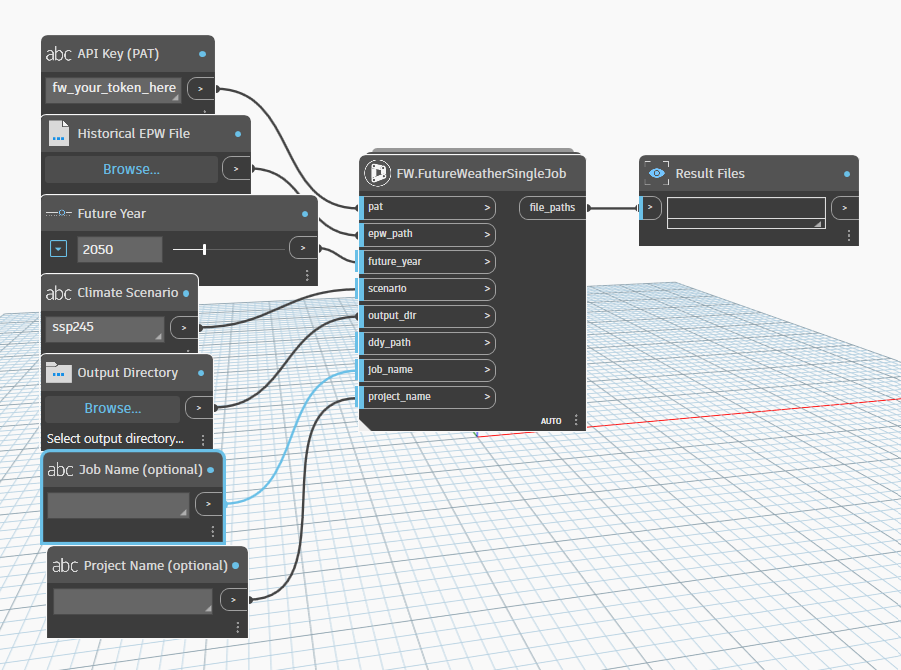
Open one of the included example graphs with File > Open, because the templates do not appear in the node library. Fill in your inputs and click Run. Processing happens in the cloud and typically finishes in under a minute per file.
Included templates live in your Dynamo packages folder under FutureWeather\extra:
If your installed Dynamo version is different, replace 3.6 with your version number, such as 3.5 or 3.7.
%APPDATA% points to your Windows AppData\Roaming folder, not AppData\Local.
First-run tip
If an example graph opens with nodes stacked in the top-left corner, press Ctrl+L in Dynamo to run Cleanup Node Layout. This is a known layout issue in some Dynamo installs.
Included templates
The package includes ready-to-use Dynamo templates so you do not have to build a graph from scratch just to test the workflow. Use them as-is or adapt them into your own firm templates and handoff standards.
FW_SingleJobExample.dyn
Generate one future EPW for a single year and scenario. This is the fastest way to validate your API key, EPW input, and output folder setup.
FW_SingleJobWithDDYExample.dyn
Same as the single-job template, but with a historical DDY input so you can generate a matching future DDY for HVAC sizing workflows.
FW_BatchJobExample.dyn
Generate EPWs for multiple year and scenario combinations in one run. For example, [2050, 2080] with ["ssp245", "ssp585"] creates four future EPW files.
FW_BatchJobWithDDYExample.dyn
Run the same multi-year, multi-scenario batch workflow with future DDY files generated alongside each EPW result.
Included nodes
The package includes both one-step nodes for quick use and lower-level nodes for custom Dynamo graphs.
FW.FutureWeatherSingleJob
Submit, wait for completion, and download results in one step. Best for straightforward single-file workflows.
FW.FutureWeatherBatchJob
Generate multiple year and scenario combinations in one run. Best for option studies, resilience testing, and packaged handoffs.
FW.Authenticate
Validate your API key and confirm account access before launching a generation run.
FW.GenerateFutureWeather
Submit a job without waiting for download. Useful when you want finer control over sequencing in a custom graph.
FW.CheckJobStatus
Poll a submitted job and determine when outputs are ready to download.
FW.DownloadResults
Download generated EPW, DDY, and STAT files after a job completes.
Input reference
Every input field used by the FutureWeather Dynamo nodes is summarized below.
| Input | Required | Description |
|---|---|---|
| pat | Yes | Your Personal Access Token. Starts with fw_. Create one in the app under API Docs > API Keys. |
| epw_path | Yes | Path to your historical EPW weather file. Use a File Path node in Dynamo to select it. |
| future_year | Yes | Target year refers to the future climate period that your weather files will represent. By default, this tool uses a standard 30-year window (±15 years) around your target year in order to reduce statistical noise. Enter an integer between 2035 and 2090, such as 2050. |
| future_years | Yes, batch | List of target years for batch generation. You can select multiple years, for example [2050, 2080]. |
| scenario | Yes | CMIP6 climate scenario code representing a possible future. Climate scenarios combine socioeconomic pathways with different levels of greenhouse gas emissions. In general, higher scenarios such as ssp585 represent more warming and greater climate impacts. See the scenario reference below. |
| scenarios | Yes, batch | List of climate scenario codes for batch generation. You can select multiple scenarios, for example ["ssp245", "ssp585"]. |
| output_dir | Yes | Directory where generated files will be saved. Use a Directory Path node in Dynamo. |
| ddy_path | No | Path to a historical DDY file. When provided, a future-adjusted DDY is generated alongside the EPW. |
| job_name | No | Friendly label for the job, such as "Chicago Office 2050", to help identify it later. |
| project_name | No | Project label used for organization in the FutureWeather dashboard. If it does not exist yet, it is created automatically. |
Climate scenarios
| Scenario | Code | Global Warming by 2100 |
|---|---|---|
| SSP1-2.6 | ssp126 |
~1.8C |
| SSP2-4.5 | ssp245 |
~2.7C |
| SSP3-7.0 | ssp370 |
~3.6C |
| SSP5-8.5 | ssp585 |
~4.4C |
Climate scenarios represent possible futures. They combine socioeconomic pathways with different levels of greenhouse gas emissions. In general, higher scenarios like SSP5-8.5 represent more warming and greater climate impacts. You can select multiple scenarios.
Climate models
FutureWeather uses an ensemble of 23 CMIP6 global climate models to produce robust multi-model average projections. In the Dynamo package, the full ensemble is used automatically by default.
If you need to select specific climate models for research or a custom workflow, use the FutureWeather web app or API, both of which support model-level selection.
What you get
Future EPW
Annual hourly weather data for EnergyPlus, OpenStudio, DesignBuilder, and similar simulation tools. Always generated.
Future DDY
Future design day conditions in ASHRAE format. Generated when you provide a historical DDY input.
STAT report
Climate statistics summary generated alongside the EPW output for quick review and reporting.
Batch generation
Need multiple scenarios or multiple future years? Use FW.FutureWeatherBatchJob to generate all combinations in one run.
Example: [2050, 2080] x ["ssp245", "ssp585"] creates four future weather files in a single run, using four credits.
Results are organized into folders by year and scenario, such as output_dir/2050_ssp245/ and output_dir/2080_ssp585/.
Why Future Weather
The science
Pricing
The Dynamo package is free. Weather file generation uses credits, where one credit equals one run and includes an EPW, STAT, and optional DDY output.
| Credits | Price | Per File |
|---|---|---|
| 1 | $50 | $50 |
| 4 | $100 | $25 |
| 8 | $160 | $20 |
| 10+ | $17 each | $17 |
New users get 5 free credits to test the service and try the included Dynamo templates.
Enterprise & Partners
Planning larger rollouts, team workflows, or partner offerings? We offer volume discounts, organization-wide purchasing, and support for enterprise and implementation partners.
Compatibility
Environments
2025 and newer
Current Revit Dynamo environments, including 3.6 and 4.x
10 and 11
Pure Python package with no extra pip install required
Output files
FutureWeather generates standard weather file outputs that fit directly into downstream simulation, sizing, and comfort analysis workflows after you leave Revit.
Use the outputs with EnergyPlus, OpenStudio, DesignBuilder, Ladybug Tools, IES VE, and other software that accepts standard EPW weather files.